

What are the ways to apply for new SBI debit card?
When it comes to applying for an SBI ATM card, there are several convenient options available to meet your needs:- Online Application: You can apply for an SBI ATM card online through the official SBI website. Log in to your SBI account, navigate to the ATM card section, and follow the on-screen instructions to request a new card. Click here to see the step-by-step procedure.
- SBI YONO App: Download the SBI YONO (You Only Need One) app on your mobile device. Log in with your SBI credentials, and you can easily apply for a new ATM card within the app. Check the details here.
- Visiting a Local SBI Branch: You can visit your nearest SBI branch in person. Fill out the necessary forms for a new ATM card application, and the bank’s staff will guide you through the process.
- Contacting SBI Customer Care: You can get in touch with SBI’s customer care service through phone or email. They will assist you in applying for a new ATM card and guide the process.
SBI Debit Card Replacement Online
SBI Debit Card replacement online is easy. When you apply for a new SBI Debit Card online, Your SBI home branch will process your request and send you the ATM Card by post. When your SBI ATM card validity expires, you don’t have to apply for a new SBI debit card, SBI will send the new EMV chip-based ATM Card by Post. To get the new SBI Credit Card, you can Apply for the SBI Credit Card Online. Check the Video on how to Apply new SBI ATM Card Online.How to Know SBI Debit Card Expiry Date
To find the SBI Debit card Expiry Date, Follow below steps:- Log in to your Online SBI Internet Banking Account
- Click on ‘e-Services’ then ‘ATM Card Services‘
- Click on ‘ATM Limit Change ‘. There you can find your SBI ATM Card expiration date.


SBI ATM card apply Online Registration
Let’s check the SBI Debit Card Replacement Procedure (SBI ATM Card Online Registration): Follow the below steps to apply for the new SBI ATM/Debit card through an online internet banking account. If you don’t have an SBI online account, then you can download the SBI ATM Card application form online and submit it to your home branch.-
- Login your SBI Online Banking Account (Internet Banking Account)
- Click on the e-Services menu and select ‘ATM Card Services‘
- Click on Request ATM/Debit Card
- Select your Primary Account Enter your Name on the Card and Select the Type of Card you want to apply for.
- Select the Mode of Validation and Proceed.
Step 1: Log in to OnlineSBI.com
Use your SBI Internet Banking username and Password. Note: Never Share your SBI Internet Banking username, Password, ATM Card Number, or CVV Number with anyone.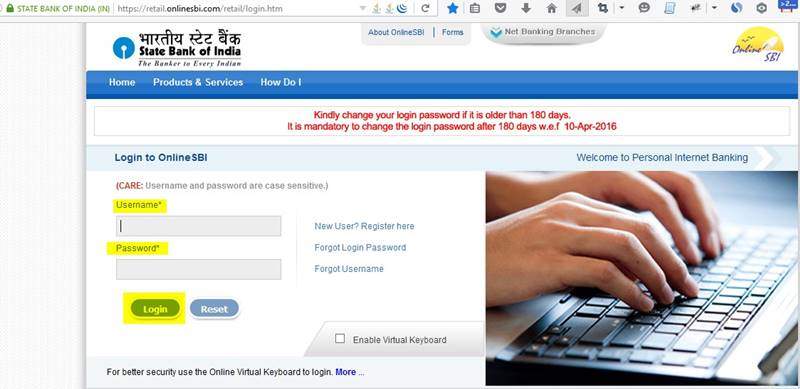 Step 2: Click on ‘e-Services‘ on the top Menu and Then click ‘ATM Card Services’.
 There you can see different SBI ATM Card Services (debit card) options
- Block ATM Card
- ATM Card Limit/Channel/Usage Change
- ATM PIN Generation
- New ATM Card Activation
- Request ATM/Debit Card
 Step 4: Select your Primary SBI Account.
Now you will get an option to select your Primary SBI Account Number and then enter the ‘Name on the Card’ (SBI ATM Card). Also, select the type of Card from the drop-down selection.
Step 4: Select your Primary SBI Account.
Now you will get an option to select your Primary SBI Account Number and then enter the ‘Name on the Card’ (SBI ATM Card). Also, select the type of Card from the drop-down selection.
 The following Type of SBI Debit/ATM Cards will be available.
- SBI Global International Debit Card (Master Card)
- SBI PayPass International Debit Card (Master Card)
- SBI Global International Debit Card (Visa)
- SBI PayWave International Debit Card (Visa)
- SBI Calssic Domestic Debit Card (Visa)
- SBI Classic Domestic Debit Card (Master Card)
- SBI Classic Domestic Debit Card (Rupay)

How to Apply New SBI ATM Card Online Using OTP (One Time Password Method)
Step 5: If you have selected ‘Using One Time Password (OTP), then you will get an OTP in your SBI Registered Mobile Number. If you have not registered your Mobile Number with SBI, then you can register your Mobile Number using any SBI ATM. If you want to change your already registered Mobile Number, you can change it online. If you have not registered your Mobile Number, your SBI registered Mobile Number is missing or not available to you right now, then don’t worry.
You can still apply for the new SBI ATM card using your SBI Internet Banking Profile Password option. Just select the ‘Using Profile Password’ option as the mode of validation.
Step 6: Enter the OTP Received in your registered Mobile Number if you have selected the OTP method, otherwise enter your profile password and click on the ‘Submit‘ button.
Confirm the details on the next page and click on the ‘Submit‘ button.
Now you can see a Success message ‘Congratulations! your card request has been recorded. You will receive your debit card within 7-8 working days at your registered address.’
Now you will get an SMS in your SBI registered Mobile Number confirming the new SBI ATM Card application.
Once the new SBI ATM card request is received, SBI will process your application and deliver the new ATM card through Speed Post to your SBI registered postal address.
They will send an SMS with the Shipment Number to your registered Mobile Number. You can track the SBI ATM card delivery status easily.
If you have not registered your Mobile Number, your SBI registered Mobile Number is missing or not available to you right now, then don’t worry.
You can still apply for the new SBI ATM card using your SBI Internet Banking Profile Password option. Just select the ‘Using Profile Password’ option as the mode of validation.
Step 6: Enter the OTP Received in your registered Mobile Number if you have selected the OTP method, otherwise enter your profile password and click on the ‘Submit‘ button.
Confirm the details on the next page and click on the ‘Submit‘ button.
Now you can see a Success message ‘Congratulations! your card request has been recorded. You will receive your debit card within 7-8 working days at your registered address.’
Now you will get an SMS in your SBI registered Mobile Number confirming the new SBI ATM Card application.
Once the new SBI ATM card request is received, SBI will process your application and deliver the new ATM card through Speed Post to your SBI registered postal address.
They will send an SMS with the Shipment Number to your registered Mobile Number. You can track the SBI ATM card delivery status easily.
SBI ATM Card Application Form Online Download
If you want to download the SBI Application form for the ATM card, you can directly download it from the SBI Portal. Download Link: https://sbi.co.in/documents/26274/68559/ATM+APPLICATION.pdf You can print this application form for atm/debit card and submit the filled application form in your home branch.How to fill Application Form for ATM Card SBI?
To fill out the application form for the ATM / Debit Card, follow the below steps: Step 1: SBI ATM Apply form PDF Download from here. Step 2: Fill in your Name, Address for correspondence, City, State, PIN code, Mobile Number, Branch, Account Number, etc in Capital Letters. Step 3: Make sure that one box space is given between each word. Step 5: Sign the Declaration form and submit it. Note: If you are a joint account holder, you have to submit separate application forms.SBI Debit Card Apply Online without Net Banking (YONO APP)
You can apply for the new SBI Debit card, even if you don’t have a Net Banking account. Just Install the YONO SBI App on your SBI registered Mobile Number sim card Phone. To use the YONO SBI App on your Mobile, make sure that you have uninstalled Team Viewer and AnyDesk Remote Access Apps. Otherwise, YONO will show a warning and you cannot use it. See the screenshot below. Follow the below Steps for the SBI debit card application online through YONO App:
Step 1: Download and Install the YONO SBI app on your Mobile Phone and Complete the registration.
Step 2: Open the Menu on Top Left and tap on ‘Service Request‘
Follow the below Steps for the SBI debit card application online through YONO App:
Step 1: Download and Install the YONO SBI app on your Mobile Phone and Complete the registration.
Step 2: Open the Menu on Top Left and tap on ‘Service Request‘
 Step 3: In the next screen tap on the ‘ATM/Debit Card‘ Menu. Now you will be asked to input the SBI Internet Banking Profile Password.
After the successful validation, you will be redirected to the ATM/Debit Card service request page.
Step 4: Now tap on the ‘Request New/Replacement‘ menu. There you can select your Account Number, Type of Card, Address for dispatch and other details.
Step 3: In the next screen tap on the ‘ATM/Debit Card‘ Menu. Now you will be asked to input the SBI Internet Banking Profile Password.
After the successful validation, you will be redirected to the ATM/Debit Card service request page.
Step 4: Now tap on the ‘Request New/Replacement‘ menu. There you can select your Account Number, Type of Card, Address for dispatch and other details.

SBI Credit Card Application Online
If you are looking for an SBI Credit Card, then you can easily Apply for the SBI Credit Card Online. You get a gift voucher worth Rs 500 on successfully applying for any SBI Card and making your first transaction of Rs 500 and above. To get the gift voucher of Rs 500, Follow the below steps: Step 1: Go to the SBI Credit Card E-Apply Page – Click here to visit the E-Apply Page. Step 2: From the list select an SBI Credit card of your choice. You can filter the card by selecting the Credit Card Category. Step 3: Click on the Apply Now button below the selected Card. Step 4: Now you can see the selected Card and a form to fill in the basic details about you. Fill out the form by entering a valid mobile number and E-mail address. Step 5: Verify your mobile number and enter the OTP. After entering all the required fields, click on the Submit button. Step 6: The SBI Credit card department will process your application and contact you to verify the details. Note: When you get calls from customer care, do not disclose the OTP received on your Mobile number, ATM PIN or any passwords. Once the application process is successful, you will get the credit card at your given residential address. You can use it to make online purchases. Note: To get the gift voucher worth Rs 500, use the Referral Code: 2t6aezrQoLc [sc_fs_multi_faq headline-0=”h2″ question-0=”Can I apply for SBI ATM Card Online?” answer-0=”Yes, you can apply for the SBI ATM card online without visiting your branch if you have an active internet banking account. Login to the account, then Click on the e-Services menu and select ‘ATM Card Services‘, then go to Click on Request ATM/Debit Card section.” image-0=”” headline-1=”h2″ question-1=” How can I apply for SBI ATM card offline?” answer-1=”You can apply for the ATM card offline by visiting your home branch. You can download the new ATM card the application form or replacement form from here https://sbi.co.in/documents/26274/68559/ATM+APPLICATION.pd fill it and submit it in your home branch.” image-1=”” headline-2=”h2″ question-2=” How can I fill SBI debit card application form?” answer-2=”Filling SBI debit card application form is very simple. Enter your Name, Address, City, Branch, Account Number and other details in Capital letters, Sign the declaration form and submit it to the branch.” image-2=”” count=”3″ html=”true” css_class=””] If you have any Questions / Need help Applying for an SBI ATM/Debit Card Online, Post your Comments below. Also, share this useful information with your friends. For more updates, Follow us on Social Media. Please Support us by Subscribing to Our YouTube Channel, Like and Sharing the Video. If you have any questions or need help, you can chat with us, or Post a comment below.Related Posts:
- How to Activate SBI Anywhere App
- Activate SBI Debit Card Fast 2020
- How to change SBI ATM PIN Number online
- How to Change SBI Registered Mobile Number Online
- SBI Green Pin Process
- How to Block SBI ATM Cards Online
- How to add beneficiary in Online SBI to transfer funds
SBI Debit Card Types — Which One to Choose
When applying online, SBI asks you to select a card type. Most people pick the first option without knowing the difference. Here is what each card actually offers:
| Card Type | Daily ATM Limit | Online/POS Limit | Annual Fee | Best For |
|---|---|---|---|---|
| SBI Classic Debit Card | Rs 20,000 | Rs 50,000 | Rs 125 + GST | Basic banking — regular savings account |
| SBI Global International | Rs 40,000 | Rs 1,00,000 | Rs 175 + GST | International travel, online shopping |
| SBI Platinum Debit Card | Rs 1,00,000 | Rs 2,00,000 | Rs 425 + GST | High-value transactions, premium banking |
| SBI Rupay Select | Rs 50,000 | Rs 2,00,000 | Rs 290 + GST | Insurance benefits, contactless payments |
| SBI YONO Pay Debit Card | Rs 40,000 | Rs 1,00,000 | Rs 200 + GST | Digital-first users, YONO app integration |
For most Kerala and Gulf Malayalee customers who use the card for UPI, online transfers and occasional ATM use, the Global International card strikes the right balance — higher limits with moderate fee. If you only need ATM access, the Classic is enough.
Method 1 — Apply SBI ATM Card via YONO App (Easiest)
- Open YONO SBI app and login with MPIN
- Tap Service Request from the bottom menu
- Select ATM/Debit Card Services
- Tap Request New/Replacement Card
- Select your account number
- Choose card type (see table above)
- Confirm your registered address — card delivers here
- Verify with OTP sent to registered mobile
- Tap Submit — application confirmed
Method 2 — Apply via SBI Net Banking
- Login to onlinesbi.sbi with username and password
- Click e-Services in the top menu
- Select ATM Card Services
- Click Request ATM/Debit Card
- Select your account number from the dropdown
- Choose card variant
- Enter your name as it should appear on the card
- Verify registered address
- Enter Profile Password or OTP to authenticate
- Submit — confirmation number displayed on screen
Method 3 — Apply at SBI Branch
If you do not have net banking access or YONO registered, branch application is straightforward:
- Visit your SBI home branch (the branch where your account was opened)
- Ask for the ATM/Debit Card application form
- Fill your name, account number, card type and signature
- Submit with a copy of your passbook or account statement
- Card dispatched within 3-5 working days from branch processing
Delivery Timeline — What to Expect
| Application Method | Processing Time | Delivery Time | Total Wait |
|---|---|---|---|
| YONO App or Net Banking | 1-2 working days | 5-7 working days | 7-10 working days |
| Branch application | 3-5 working days | 5-7 working days | 8-12 working days |
| Remote/rural areas | 1-2 working days | 7-10 working days | 10-15 working days |
SBI sends an SMS with Speed Post consignment number once the card is dispatched. Use this to track on India Post consignment tracking. If no SMS after 10 working days, check application status via YONO or Net Banking.
After Receiving Your SBI Debit Card — Activation Steps
A new SBI card is inactive when you receive it. Do these steps before trying to use it:
- Generate Green PIN first: Send SMS — PIN (space) last 4 digits of card (space) last 4 digits of account number — to 567676 from your registered mobile. SBI sends a One Time PIN (OTP Green PIN) via SMS.
- Visit SBI ATM: Insert card — select Banking — enter the Green PIN received via SMS — select Change PIN — set your new 4-digit PIN.
- Or activate via YONO: YONO App — Accounts — My Debit Cards — Activate Card — enter 16-digit card number — verify OTP — set PIN directly.
- Enable international transactions separately if needed: YONO — Manage Cards — Card Controls — enable International Use.
When SBI Debit Card Application Fails or Is Delayed
| Problem | Cause | Fix |
|---|---|---|
| Application rejected online | Existing active card on account or KYC pending | Check if you already have an active card via YONO — My Debit Cards. If KYC pending, update KYC first then reapply. |
| No confirmation SMS after applying | Mobile number not registered or wrong number | Check registered mobile via YONO — Profile. Update at branch if wrong. Application still processes — check status via Net Banking. |
| Card not received after 15 days | Delivery failed or address issue | Track via India Post with consignment number from SMS. If returned to SBI, visit home branch — they hold returned cards 30 days. |
| Name wrong on card | Name mismatch in SBI records | Do not activate. Visit branch with Aadhaar — request name correction and reissue. Old card destroyed. |
| Card showing inactive after PIN set | Green PIN not converted to permanent PIN at ATM | Visit any SBI ATM — insert card — enter Green PIN — change to new permanent 4-digit PIN. Card activates after this step. |
Apply for SBI ATM card online in 2026 using two methods. Via YONO app: Login — Service Request — ATM Debit Card Services — Request New Card — select account and card type — verify address — submit OTP. Via Net Banking: Login to onlinesbi.sbi — e-Services — ATM Card Services — Request ATM Debit Card — select account — choose card type — authenticate with profile password or OTP. Card delivered in 7-10 working days via Speed Post to your registered address.
SBI ATM card takes 7-10 working days to arrive after applying online via YONO or Net Banking. The bank processes the request in 1-2 working days and dispatches via India Post Speed Post which takes 5-7 working days. Remote and rural areas may take 10-15 working days. SBI sends an SMS with the Speed Post consignment number after dispatch so you can track delivery on the India Post website.
For most SBI customers in 2026, the SBI Global International Debit Card is the best option. It offers Rs 40,000 daily ATM limit, Rs 1,00,000 online and POS limit, works for international transactions and costs Rs 175 plus GST annually. For basic ATM use only the Classic Debit Card at Rs 125 plus GST is enough. For high-value transactions the Platinum card allows Rs 1,00,000 ATM and Rs 2,00,000 online limits at Rs 425 plus GST.
Yes. Existing SBI customers with net banking or YONO access can apply for a new ATM card without visiting the branch. Use YONO app — Service Request — ATM Debit Card Services — Request New Card, or login to onlinesbi.sbi — e-Services — ATM Card Services — Request ATM Debit Card. No branch visit needed for application or delivery as card arrives via Speed Post. Branch visit is only needed if your address needs updating or if you want a specific card type not available online.
After receiving your SBI debit card generate a Green PIN first. Send SMS: PIN (space) last 4 digits of your card (space) last 4 digits of your account number to 567676 from your registered mobile. SBI sends a One Time Green PIN via SMS. Then visit any SBI ATM, insert card, enter the Green PIN, select Change PIN and set your permanent 4-digit PIN. Alternatively activate via YONO app — Accounts — My Debit Cards — Activate Card and set PIN directly without visiting ATM.
If SBI ATM card not received after 15 working days, first track via the Speed Post consignment number sent by SMS on the India Post website. If tracking shows delivered but not received, check with neighbours and visit the post office with ID proof. If tracking shows returned to sender, visit your SBI home branch immediately — returned cards are held for 30 days then destroyed. If no consignment number received, check application status via YONO — Manage Cards — Debit Card Issuance Tracking or Net Banking — e-Services — ATM Card Services.
Yes. You can apply for a replacement or upgraded SBI debit card even if you have an existing active card. Use YONO app — Service Request — Request New or Replacement Card, or Net Banking — e-Services — ATM Card Services. Reasons for reapplying include damaged card, expired card, lost card, upgrading to a higher card type or changing card variant. Once the new card arrives and is activated the old card is automatically blocked in most cases. Confirm with SBI if you need the old card blocked immediately.
International transactions on SBI debit card are disabled by default for security. Enable via YONO app: Login — Manage Cards — select your card — Card Controls — International Transactions — toggle on. Or via Net Banking: e-Services — ATM Card Services — Enable International Usage. You need a card that supports international use such as the Global International, Platinum or Rupay Select. The Classic card does not support international transactions. Enable only when travelling or shopping internationally and disable when back.
Guide by Robins Antony, Digital Finance Writer, Webova Soft, Changanacherry, Kerala. SBI ATM card application steps verified from official YONO SBI app and onlinesbi.sbi Net Banking as of September 2026. Card types, fees and limits subject to change — verify current details at SBI official website.

5596010058623776 sbi saving account no-31715084151 mobile no- 9423376297 please pin (otp)will be sent your registered mobile no-
Sir
My SBI ATM cum debit card Maestro valid from Nov 2005 is became old . Whenever it use in ATM machine it says not inserted properly.
My SBI a/c no 10481600969
Name Chinthala Jagathkumar Kumar
Branch. Vedayapalem , Nellore
Yoursincerly
C.Jagath Kumar
Plzz change the my sbi ac mob no….
Is PAN card is necessary for activation of atm card in SBI
after submiting in last stage i am getting msg that NO TEMPORARY ADDRESS DETAILS FOUND FOR THE NRE CUSTOMER
what to do in this case?
Debit card apply
sir please एप्लीकेशन De chuka hoon Mera ATM chalu nahi hua abhi tak chalu kar dijiye please
How to ATM card apply
I need to new atm card
I HAVE TO OPEN SBI ATM ONLINE.
Good
Nice ,But i’m lost my sbi debit card ,so give me full solution of this problem .
My old atm card is not in good condition.so want new atm card.my mobile no.9923441314.
Check How to activate SBI Debit card Online Fast
You can apply for new SBI ATM card online. Login OnlineSBI and follow the instructions in this post.
No, Pan card is not nesessary for the activation of atm card in SBI
New ATM card
New ATM card apply kardo
New ATM card
SBI new ATM card apply
I need new sbi atm card.
Dear Team,
I have applied for new atm card on 28th August 2018 due to old ATM Card is broken. but until now i did not receive my new atm card. Current location is showing NSH Mumbai, while my location is lucknow . Please advise accordingly.
Please make a new atm
Sbi debit card apply palani pappampatti 624264
Bhairuthali Gaonri Tonk Rajasthan
New Atm card
atm cand
p.4.672 sultan pure delhi 110086