

📌 What is SBI CIF Number?
- 11-digit unique customer ID
- Digital record of all your SBI accounts
- Contains KYC, loan, and transaction history
- Required for most banking services
🚀 5 Ways to Find Your SBI CIF Number
1️⃣ Through SBI Net Banking (Fastest Method)
✅ Best for: Tech-savvy users ⏳ Time: 2 minutes Step-by-Step:-
-
- Login to SBI Net Banking using your SBI Online User Name and Password.
- Click on the Account Summary Menu on the left. There you can see your SBI Account Number, Branch etc ie; “Account Summary” → Select your account
- Choose “View Nomination and PAN Details”
- Your CIF number appears beside the account details


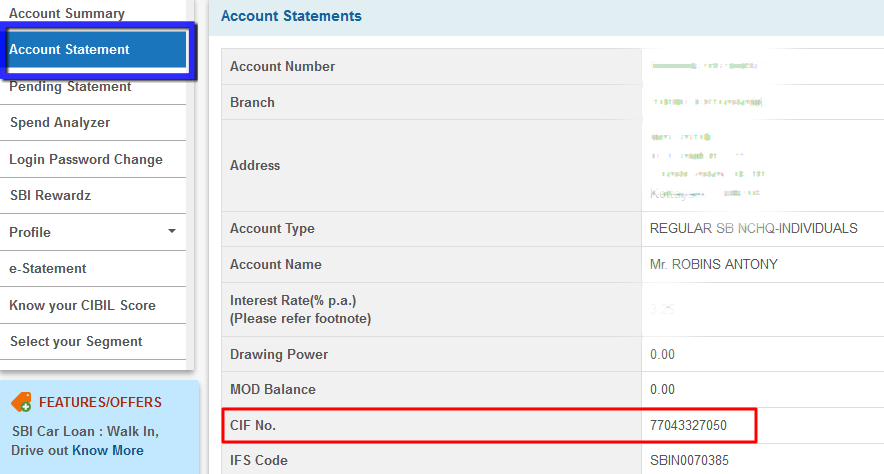
2️⃣ From Account Statement
✅ Best for: Those needing transaction records- Login to Net Banking
- Go to “Account Statement”
- Select any statement period
- Find the CIF number in the header section

3️⃣ Check Your Passbook
✅ Best for: Offline banking users 🔍 Look at the first page of your passbook – CIF is printed near your account details.
-
4️⃣ Find in Cheque Book
✅ Best for: Quick physical verification Your CIF number is printed on:- First page of cheque book
- Below account number on cheques
5️⃣ Call SBI Customer Care
✅ Best for: Those without net banking 📞 Dial any SBI helpline:- Toll-Free: 1800 425 3800
- Toll Number: 080-26599990
-



📱 How to Get an SBI CIF Number via WhatsApp Banking (Indirect Method)
While WhatsApp Banking doesn’t directly display your CIF number, you can use this smart workaround to access it through your e-statement. Here’s the complete guide:🔄 Step 1: Register for SBI WhatsApp Banking
Option A: Via SMS- From your registered mobile number, send SMS:
to +917208933148
WAREG <Your Account Number>
- Scan the QR code from:
- SBI Internet Banking portal
- Official SBI website
- Send “Hi” to +919022690226 on WhatsApp
- Follow the chatbot instructions
📥 Step 2: Request Your E-Statement
- Open WhatsApp chat with +919022690226
- Type “Hi” and send
- Select “Account Services” → “E-Statement”
- Choose a statement period (recommend 1 month)
- Verify with OTP when prompted
🔍 Step 3: Locate Your CIF Number
- Open the PDF e-statement
- Check the top header section
- Your 11-digit CIF number appears beside:
- Account number
- Branch details
- Customer name
🆕 Alternative Method: Using YONO SBI App
For faster access, try this direct method:- Login to YONO SBI app
- Tap “Profile” → “Account Details”
- Select your account
- View complete details including:
- CIF number
- Account type
- Branch information
⚠️ Important Notes
- WhatsApp Banking available 24/7
- Only works with registered mobile number
- E-statements are password protected (use last 6 digits of debit card + DOA in DDMMYY format)
- For security, never share OTP or banking details with anyone
🔗 More Useful SBI Resources
- How to Link Mobile Number with SBI Account
- SBI Net Banking Registration Guide
- Find SBI Branch IFSC Code
📌 Key Takeaways:
- CIF number is essential for all SBI banking services
- Easiest to find via Net Banking or passbook
- Never share your CIF with unknown callers
- Update your CIF details if any information changes
- Also Read SBI Related Posts:
All Methods to Find SBI CIF Number — 2026
| Method | Time | What You Need | Best When |
|---|---|---|---|
| SBI Passbook | Instant | Physical passbook | Fastest — always check here first |
| Cheque Book | Instant | SBI cheque book | No passbook but have cheque book |
| YONO App | 1 minute | YONO login | No physical documents available |
| SBI Net Banking | 2 minutes | Net banking login | Desktop access |
| IVR Call 1800 11 2211 | 2 minutes | Registered mobile | No smartphone or internet |
| Account Statement | Instant | Printed or PDF statement | Statement already available |
| Branch Visit | 30-60 minutes | Aadhaar + passbook | All other methods failed |
Method 1 — Find CIF on SBI Passbook (Fastest)
Open your SBI passbook to the first page. The CIF number is printed near the top — usually labelled as “CIF No.” or “Customer ID.” It is an 11-digit number. This is the quickest way — no internet or phone needed.
If the print is faded or unclear, take the passbook to any SBI branch passbook printing kiosk and request a reprint of the first page.
Method 2 — Find CIF on SBI Cheque Book
Open your SBI cheque book to the inside front cover or first page. The CIF number is printed there along with your account number and name. If your cheque book is old (before 2015) it may not show the CIF number — use another method.
Method 3 — Find CIF via YONO App
- Open YONO SBI app and login with MPIN
- Tap Services from the bottom menu
- Select Online Nomination
- Select account type: Transaction Account
- Your CIF number is displayed on this screen
Alternative path in newer YONO versions: tap your Profile icon — Account Details — CIF number visible in account information.
Method 4 — Find CIF via SBI Net Banking
- Login to onlinesbi.sbi
- Click My Accounts in top menu
- Select Profile
- Click Account Summary
- Select View Nomination and PAN
- Your 11-digit CIF number is displayed
Method 5 — Find CIF via IVR Call (No Internet Needed)
- Call 1800 11 2211 (toll free) from your registered mobile number
- Follow IVR instructions — select language
- Select account enquiry or customer information option
- Verify identity with date of birth or account number when prompted
- SBI sends your CIF number via SMS to your registered mobile
Method 6 — Find CIF on Account Statement
Your SBI account statement — both printed branch statement and PDF downloaded from YONO or Net Banking — shows your CIF number at the top of the document near your account details. If you have a recent statement saved, check there first before trying other methods.
CIF Number vs Customer ID vs Account Number — What Is the Difference
| Term | Digits | What It Is | Where Used |
|---|---|---|---|
| CIF Number | 11 digits | Unique customer identifier — links all your SBI accounts, loans and deposits | KYC verification, branch requests, loan applications |
| Account Number | 11 digits | Specific to one account — you can have multiple account numbers | NEFT/RTGS transfers, UPI linking, salary credits |
| Net Banking Username | Variable | Login ID for onlinesbi.sbi — set by you during registration | Net banking login only |
| Customer ID | 8-11 digits | Same as CIF number in SBI — different banks use different terms | Same as CIF number |
What Is SBI CIF Number Used For
- KYC verification: Banks and financial institutions verify your identity using CIF
- Linking multiple accounts: All your SBI savings, current, FD and loan accounts are linked under one CIF
- Loan applications: SBI uses CIF to pull your complete banking history when you apply for a loan
- Net banking registration: Required when first registering for SBI internet banking
- Account portability: Transfer your account from one SBI branch to another using CIF
- Nominee and PAN linking: Accessed via CIF in net banking
Troubleshooting — Cannot Find SBI CIF Number
| Situation | Fix |
|---|---|
| Passbook not available and no net banking | Call 1800 11 2211 from registered mobile — IVR sends CIF via SMS. Works without internet or passbook. |
| YONO shows different number than passbook | YONO and passbook should show same CIF. If different, passbook is authoritative. Visit branch to verify. |
| CIF number not visible in YONO | Update YONO app first. Try alternative path: Profile — Account Details. If still not visible use Net Banking method. |
| Net banking shows “CIF not found” | Your account may not be fully KYC compliant. Visit home branch with Aadhaar — update KYC — CIF will then be accessible online. |
| Old account — CIF not on passbook | Passbooks issued before 2012 may not print CIF. Visit branch with old passbook and Aadhaar — request updated passbook with CIF printed. |
SBI CIF number stands for Customer Information File number — an 11-digit unique identifier assigned to every SBI customer. It links all your accounts, loans and deposits under one profile. Find it on the first page of your SBI passbook or cheque book. Online via YONO app — Services — Online Nomination — select account. Via net banking — My Accounts — Profile — Account Summary — View Nomination and PAN. Via IVR call to 1800 11 2211 — CIF sent via SMS. The CIF number never changes and remains the same for all your SBI accounts throughout your lifetime.
Find SBI CIF number without passbook using three methods. YONO app: login — Services — Online Nomination — select transaction account — CIF displayed. Net banking: login to onlinesbi.sbi — My Accounts — Profile — Account Summary — View Nomination and PAN — CIF shown. IVR call: call 1800 11 2211 from your registered mobile number — follow IVR instructions — CIF sent via SMS. Your account statement PDF also shows CIF number at the top near account details. No branch visit needed for any of these methods.
Yes. In SBI the CIF number and Customer ID refer to the same 11-digit number. Different SBI interfaces use different terms — YONO app may show it as Customer ID while the passbook and net banking show it as CIF number. Both are the same number. This number is different from your account number — you can have multiple account numbers but only one CIF number per customer. It is also different from your net banking username which you set during registration.
No. Your SBI CIF number is permanent and never changes. It stays the same when you transfer your account to a different branch, change your registered address, change your mobile number, open additional accounts, close existing accounts or take a new loan. The CIF number is your lifelong identifier with SBI. Even if you close all your accounts and reopen later the same CIF number is reactivated. This is what makes CIF different from account number — account numbers are account-specific while CIF is customer-specific.
Login to onlinesbi.sbi with your username and password. Click My Accounts in the top menu. Select Profile from the dropdown. Click Account Summary. Select View Nomination and PAN from the options shown. Your 11-digit CIF number is displayed on this page. This is one of the most reliable methods as it always shows your current CIF number. If you have forgotten your net banking password reset it first via Forgot Login Password on the same login page.
Yes. Call SBI customer care at 1800 11 2211 (toll free, 24×7) from your registered mobile number. Follow the IVR menu — select account enquiry or customer information. Verify your identity with date of birth or account number when prompted. SBI sends your CIF number via SMS to your registered mobile number within a few minutes. This method works without internet, passbook or the YONO app — just your registered mobile number. If calling from a different number the IVR may not verify your identity.
If CIF number is not visible in YONO app first update the app to the latest version from Play Store or App Store. Try the alternative path: Profile icon — Account Details instead of Services — Online Nomination. If still not visible use SBI net banking at onlinesbi.sbi — My Accounts — Profile — Account Summary — View Nomination and PAN. Or call 1800 11 2211 from registered mobile for IVR CIF delivery via SMS. If none work your account KYC may be incomplete — visit home branch with Aadhaar to update.
SBI CIF number is 11 digits long. It is printed on the first page of your SBI passbook and cheque book. In net banking and YONO app it appears as an 11-digit number under account details or profile. The CIF number is different from your SBI account number which is also 11 digits — they are two separate numbers. If you see a 8-digit number it is likely your old customer ID format — SBI migrated to 11-digit CIF numbers. Visit your home branch with passbook to get your current 11-digit CIF if you only have an old 8-digit number.
Guide by Robins Antony, Digital Finance Writer, Webova Soft, Changanacherry, Kerala. SBI CIF number retrieval methods verified from official YONO SBI app and onlinesbi.sbi Net Banking as of September 2026. For official SBI support call 1800 11 2211 (toll free, 24×7).
